


GE Microwave Not Heating? Here's What's Wrong and How to Fix It
You put your coffee in, hit start, and 90 seconds later it's still lukewarm. The turntable spun. The light was on. The timer counted down perfectly. But your GE microwave isn't heating, and you have no idea why.
Here's the thing: GE microwaves are built well, and when they stop heating it's almost always one specific component in the high-voltage circuit. This guide helps you figure out which one — starting with the checks you can do yourself in five minutes, and being honest about where DIY ends and professional repair begins.
Do This First: The 60-Second Water Test
Before pulling anything apart, run this test. Fill a cup with cold water, place it in the center of the turntable, close the door, and run the microwave on high for 60 seconds.
Water is hot the microwave is heating fine. The issue is a settings problem, not hardware.
Water is lukewarm partial heating failure. The magnetron or diode is degrading.
Water is stone cold complete heating failure. One of the high-voltage components has failed.
This single test tells you whether you're dealing with a settings issue or a hardware problem, and saves you from tearing into the machine unnecessarily.
Check Settings Before Assuming Hardware Failure
A microwave that seems broken is caused by a settings problem more often than most people expect. Check these before anything else:
Timer mode accidentally selected. GE microwaves have a dedicated timer function. If you accidentally selected "Timer" instead of "Cook," the microwave runs through a countdown without activating the magnetron at all. Food stays cold, everything else looks normal.
Power level set too low. GE microwaves default to full power, but if the power level was manually changed to 10–20%, you'll get almost no heat output. Press the Power Level button and confirm it's set to 10 (full power).
Control Lock active. Some GE models have a control lock that prevents the microwave from starting or heating. Check your display for a lock indicator and hold the appropriate button (usually "Cancel" or "Control Lock") for 3 seconds to release it.
Door not fully latched. GE microwaves have three or four door switches that must all engage for heating to begin. A door that appears closed but isn't fully clicked into place will stop the heating circuit while allowing the display and fan to run normally.
Quick check: Open and firmly close the door — you should hear a clear click. If the door feels loose or doesn't click, the door latch or one of the door switches may already be failing.
What's Actually Going Wrong Inside the Unit
If the settings are fine and the water test confirms no heat, the problem is inside the high-voltage circuit. GE microwaves heat food through a magnetron — a component that generates microwave radiation at 2.45 GHz that excites water molecules in food to produce heat. The magnetron is powered by a circuit involving a transformer, capacitor, and diode, all working together to supply around 4,000–5,000 volts.
A failure anywhere in that chain stops heating completely while leaving everything else functional.
Faulty High-Voltage Diode
The diode is the most common hardware cause of a heating failure. It converts AC power from the transformer to DC voltage and doubles it to power the magnetron. When it fails, the magnetron doesn't receive enough voltage to generate heat.
A failed diode often causes a loud buzzing or humming sound during operation, noticeably different from the normal microwave hum. Sometimes it's visibly burned and can be spotted during inspection.
The part itself costs $10–$25. However, it sits adjacent to the capacitor, which stores a lethal electrical charge even after the microwave is unplugged. Testing or replacing the diode without properly discharging the capacitor first is dangerous — this is the most important safety point in any microwave repair.
Blown Thermal Fuse or Thermoprotector
GE microwaves have thermal fuses and thermoprotectors designed to cut power when the unit overheats. When a thermal fuse blows, the microwave may go completely dead or lose heating depending on which fuse tripped and the specific model.
The most common cause of a blown thermal fuse is inadequate ventilation — the unit is pushed too close to a wall or upper cabinet, heat can't escape, and the fuse trips as a safety response.
Technician tip: Always find out why the thermal fuse blew before replacing it. If you replace the fuse without fixing the ventilation issue, it will blow again — sometimes within a few weeks. GE over-the-range models need at least the clearances specified in the installation guide above the unit.
Failed Door Switches
GE microwaves use three to four door switches that activate in sequence when the door closes, completing the safety circuit that allows the magnetron to run. If any single switch fails, the magnetron won't receive power — the microwave appears to run but produces no heat.
Door switches are one of the more failure-prone components, particularly on older models with high cycle counts. Signs include the microwave starting inconsistently, the interior light behaving oddly, or heating that works sometimes but not others.
High-Voltage Capacitor Failure
The capacitor works alongside the diode to store and deliver the high voltage that powers the magnetron. A failed capacitor takes down the entire high-voltage circuit, stopping heating completely.
Critical safety warning: The capacitor in a GE microwave can store 2,100 volts or more and retains that charge even when completely unplugged. Contact with a charged capacitor can cause serious injury or death. Do not open the microwave cabinet and touch components near the capacitor without properly discharging it first using insulated tools. This is not a component to test or replace without training.
Magnetron Failure
The magnetron itself eventually wears out, particularly on older GE microwaves or units that have been used heavily. When the magnetron fails, everything else continues working normally — the light, the turntable, the timer, the fan — but no heat is produced.
Waveguide Cover Damage
The waveguide cover is the small panel inside the microwave cavity (usually made of mica) that protects the opening where microwave energy enters the cooking chamber. If it gets contaminated with food splatter and isn't cleaned, it can burn, char, or crack, causing arcing (sparking) inside the microwave and reducing heating efficiency.
If you see sparking inside your GE microwave, stop using it immediately. A damaged waveguide cover is one of the more common issues on this list, and it's also one of the most straightforward to fix — replacement covers are inexpensive and easy to install.
Control Board Fault
Control board failure is less common but worth mentioning. A malfunctioning board can stop sending power to the magnetron even when every other component is working correctly. Signs include erratic behavior across multiple functions, clicking or chattering sounds, or a burning smell from the control panel area. Control board diagnosis should always come after ruling out every other component — boards are frequently misdiagnosed as the problem when a cheaper component is actually at fault.
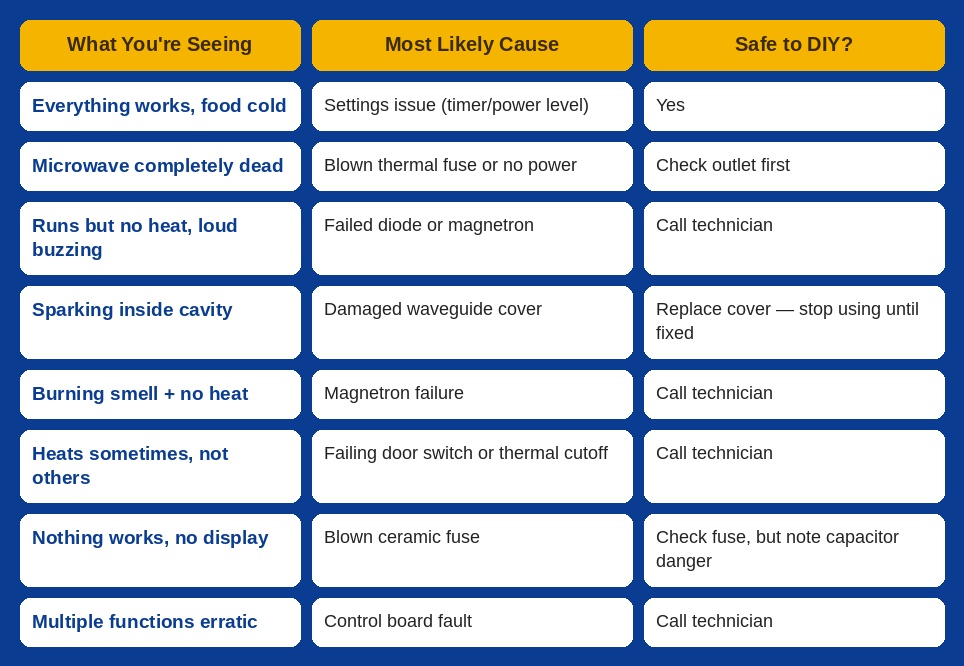
Quick Diagnostic Table
Repair or Replace Your GE Microwave?
This depends on which component failed and what type of GE microwave you have. As a general guideline: if the microwave is under 6 years old and the repair is under 50% of replacement cost, repair is almost always the smarter move. Over 8 years old with a major component failure — the magnetron or control board — it's worth getting an honest estimate before deciding.
Getting Help in Charlotte, NC
If the water test confirms a heating failure, or you're seeing sparking, a burning smell, or an error that keeps coming back, our appliance repair team in Charlotte, NC handles GE microwave diagnostics and repair across the metro, including Cornelius and Davidson. We also service the full range of microwave brands and configurations, from over-the-range to countertop units. If your GE fridge or other appliances are giving you trouble too, our refrigerator repair team covers the full GE lineup.
A microwave that runs but doesn't heat almost always comes down to one specific component and most of them aren't safe to diagnose or replace without training. Schedule a diagnostic visit today and get it fixed the right way.
GE microwave running but not heating? Our appliance repair technicians in Charlotte, NC diagnose and repair GE microwaves across the metro, including Cornelius and Davidson. Schedule your visit today.
Frequently Asked Questions
Why is my GE microwave not heating but running normally?
The most common causes are a failed high-voltage diode, blown thermal fuse, faulty door switch, or magnetron failure. All of these allow the microwave's display, light, turntable, and fan to run normally while completely stopping the heating circuit.
My GE microwave sparks and doesn't heat what do I do?
Stop using it immediately. Sparking usually means a damaged or contaminated waveguide cover inside the cavity. Inspect it if it's burnt or cracked, it needs replacing before further use. If the sparking continues after replacing the cover, there may be a deeper magnetron or high-voltage component issue.
Can I fix a GE microwave not heating myself?
Settings issues, door latch checks, and waveguide cover replacement are reasonable DIY tasks. Anything involving the capacitor, diode, thermal fuse, or magnetron should go to a technician the capacitor holds a lethal charge even when the unit is unplugged.
My GE microwave stopped heating after a power outage is it damaged?
Possibly, but not necessarily. Try unplugging for 5 minutes and restarting first power surges can trip internal safety fuses or confuse the control board. If it still doesn't heat after a full reset, a fuse or control board component may have been damaged by the surge.

